




15 October 2024


08 October 2024
The Hidden Cost of Modern Work Life
Hand and Finger Problems from Cellphone and Mouse Overuse – And How to Keep Your Hands Healthy
In today’s digital age, our hands and fingers are constantly at work, swiping, typing, and clicking. Whether you’re scrolling through your phone for hours or working long hours at a computer, modern-day work life has brought unprecedented levels of strain on our hands and fingers. The prolonged use of cellphones and computer mice can lead to several hand and finger problems, many of which are caused by repetitive motions and poor ergonomics.
Let’s take a look at some of the common hand and finger issues that arise from overuse of digital devices, how they affect our lives, and, most importantly, what can be done to prevent them.
Common Hand and Finger Problems from Device Overuse
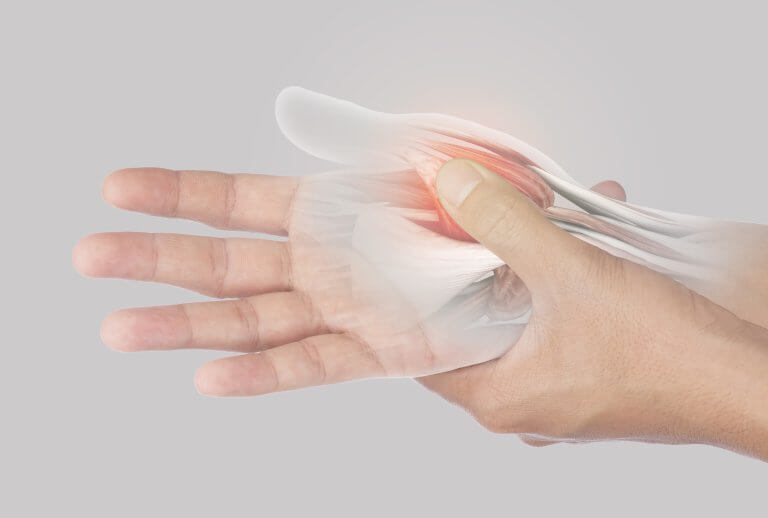
- Carpal Tunnel Syndrome Carpal tunnel syndrome occurs when the median nerve in the wrist is compressed. This compression leads to numbness, tingling, and weakness in the hand and fingers, making everyday tasks like typing and holding objects difficult. Constant use of a computer mouse or typing can exacerbate this condition.
- Trigger Finger Trigger finger is caused by inflammation in the tendons of the fingers, leading to pain and stiffness. You may experience a locking or clicking sensation when trying to bend or straighten your fingers, particularly after prolonged gripping, such as holding a phone for extended periods.
- De Quervain’s Tenosynovitis Often referred to as “texting thumb” or “gamer’s thumb,” De Quervain’s is the inflammation of the tendons around the base of the thumb. This condition causes pain when gripping, twisting, or turning your wrist, making it uncomfortable to hold a smartphone or use a mouse for long periods.
- Texting Thumb Texting thumb, also known as gamer’s thumb, is a form of tendinitis caused by the overuse of the thumbs during texting or gaming. Repeated scrolling or typing motions can inflame tendons, leading to pain, difficulty moving the thumb, and a reduced range of motion.
- Mouse Elbow Similar to tennis elbow, mouse elbow refers to the inflammation of tendons in the forearm from repetitive mouse use. This can cause pain that radiates from the elbow to the hand, affecting your ability to grip and move your fingers.
- Cubital Tunnel Syndrome Cubital tunnel syndrome occurs when the ulnar nerve (often referred to as the “funny bone” nerve) is compressed. This compression can result in pain, numbness, and tingling in the ring and pinky fingers, which are commonly affected by extended use of a keyboard or poor posture while working at a computer.
- Repetitive Strain Injury (RSI) RSI is an umbrella term for injuries caused by repetitive motions and overuse. It manifests as pain, weakness, and stiffness in the hands, wrists, and fingers. Prolonged mouse use, excessive typing, and constant phone handling are common culprits.
- Thumb Arthritis Over time, chronic use of the thumbs for scrolling and texting can lead to thumb arthritis. This painful condition results from the wear and tear of the thumb joints and can make simple movements like holding a phone or gripping objects excruciating.
- Tendinitis Tendinitis refers to inflammation of the tendons in the fingers or wrists due to overuse. Frequent typing or repetitive scrolling motions can inflame the tendons, causing pain, swelling, and difficulty with hand movements.
- Digital Fatigue Digital fatigue occurs when the muscles in the hands and fingers are overworked from long periods of using digital devices. This leads to cramping, discomfort, and a noticeable decrease in dexterity.
Why These Problems Happen
In our modern world, we rely heavily on devices for work, entertainment, and communication. This constant use of phones and computers leads to repetitive motions, such as scrolling, clicking, and typing. When combined with poor posture, lack of breaks, and bad ergonomics, these actions put unnecessary strain on the hands and fingers.
Most of us tend to ignore early warning signs like slight pain or tingling, which can eventually lead to more serious conditions that require medical attention. The best way to address these problems is to prevent them from occurring in the first place.
How to Keep Your Hands Healthy and Your Grip Strong
Luckily, there are several ways to reduce the risk of developing hand and finger problems. By taking proactive steps, you can keep your hands healthy and pain-free while maintaining a strong grip. Here’s what you can do:
- Take Regular BreaksOne of the easiest and most effective ways to prevent strain is to take regular breaks. Follow the 20-20-20 rule: every 20 minutes, take a 20-second break and look 20 feet away from your screen. This will give your hands and fingers a rest from repetitive motions.
- Practice Hand and Finger ExercisesSimple stretches and exercises can go a long way in keeping your hands flexible and strong. Try opening and closing your fingers into a fist, stretching your wrists, and gently massaging your hands throughout the day to improve blood flow and relieve tension.
- Use Ergonomic ToolsInvest in ergonomic keyboards, mice, and phone holders that reduce strain on your hands and wrists. Look for tools that allow your hands to rest in a more natural position, minimizing the risk of repetitive strain injuries.
- Maintain Good PostureProper posture is essential for reducing strain on your hands and fingers. Make sure your wrists are aligned with your forearms when typing, and avoid awkward hand positions when using your phone or mouse. Keep your desk setup at an appropriate height and angle for comfort.
- Consider a Hand Strengthening DeviceDevices like hand and finger trainers can help strengthen the muscles and tendons in your hands, improving your grip and preventing injuries. These devices are especially helpful for people who rely on their hands for work or hobbies.
- Apply Cold or Heat TherapyIf you experience discomfort, try using cold packs to reduce inflammation or heat therapy to relax stiff muscles. These therapies can be used after a long day of typing or scrolling to relieve tension and prevent further strain.
- Stay HydratedHydration is key to keeping your muscles and joints functioning properly. Drink plenty of water throughout the day to keep your tendons lubricated and to reduce the risk of cramping and stiffness.
Take Action Today
In a world where technology is central to our daily lives, it’s easy to overlook the physical toll constant device use takes on our hands and fingers. By recognizing the early signs of strain and taking proactive steps to prevent these problems, you can keep your hands healthy, your fingers agile, and your grip strong.
If you’re looking to maintain hand strength or recover from discomfort, consider Remedic’s Hand and Finger Training Systems. Our products are designed to help you strengthen your hands, improve flexibility, and reduce the risk of injury, ensuring you stay productive without pain. Keep your hands healthy and get back to doing what you love with Remedic.
Taking care of your hands today can save you from pain tomorrow. Invest in your health and keep your hands strong with these simple yet effective tips!
- #HandHealth
- #Ergonomics
- #CarpalTunnel
- #RepetitiveStrainInjury
- #DigitalWellness
Q&A List
1. Why do my hands ache after a long day of typing on the computer?
If you spend many hours typing or using a mouse, repeated motion can strain tendons, muscles and joints in your fingers, wrists and hands. Over time this can lead to discomfort, stiffness, or swelling. Simple ergonomic adjustments and light breaks can help prevent that.
2. What is “texting thumb” or “smartphone thumb” and can it affect older adults too?
Yes — the strain caused by frequent thumb and finger movement when using a smartphone or tablet can lead to tendon irritation or “tenosynovitis.” Older adults may be more vulnerable because joints and soft tissues are already less resilient. A few minutes of rest and gentle exercises can reduce the risk.
3. How can I tell if I have a work-related repetitive strain injury (RSI) in my hand or fingers?
Common signs include: persistent hand/finger/wrist pain during or after work, tingling or numbness (especially at night or when resting), weakness in grip, fingers that feel stiff or “locked.” If you’ve done a lot of the same motion (typing, fine tool work, assembly) for months, RSI should be considered.
4. What should I do at work to reduce hand and finger strain while still getting tasks done?
-
Take short breaks every 20-30 minutes — shake out hands, stretch fingers.
-
Ensure your keyboard, mouse or tools are at the correct height and angle (so wrists are not bent uncomfortably).
-
Use ergonomic aids (e.g., padded wrist rest, lighter tools, bigger handles) to reduce force.
-
Alternate tasks when possible so you’re not using the same hand/finger motion continuously.
5. My fingers feel stiff and weak after a weekend of heavy yard work — what can I do to help recover?
-
Rest the hands for a day or two; avoid heavy gripping.
-
Use a cold pack if there’s swelling, then later switch to gentle warm-up.
-
Do simple finger stretches and grip exercises (such as squeezing a soft ball) to regain strength and mobility. (Rehabilitation guidance supports this approach.) La Clinica+1
-
If the stiffness or pain persists more than a week, see a hand therapist.
6. I’ve been diagnosed with Carpal Tunnel Syndrome — how should I manage it at work and at home?
-
At work: minimize wrist flexion/extension — keep wrists neutral, use ergonomic keyboard/mouse setups.
-
At home: Use night wrist splint if recommended, take mini-breaks during the day, perform nerve gliding or finger mobility exercises.
-
In many cases, non-surgical hand therapy (ergonomic training + exercises) is the first step. Cal/OSHA
7. What are some safe hand and finger exercises I can do at home for rehabilitation?
Here are examples:
-
Finger lift: Place hand flat on a table and lift each finger slowly, 8–10 times. La Clinica+1
-
Thumb stretch: Bend thumb across the palm to the base of the pinky, hold for a few seconds, repeat 10-15 times.
-
Claw stretch: With fingers straight, bend the top two joints into a “claw,” hold 5 seconds, then straighten. Repeat 10 times.
-
Grip squeeze: Use a soft ball or sponge, squeeze for 5 seconds, release. Do 10–15 reps. La Clinica
Always stop if you feel sharp pain and consult a therapist if unsure.
8. My hands shake or I have weak grip strength — what could be causing that?
Weak grip or tremor can come from muscle fatigue, nerve compression (e.g., carpal tunnel), arthritis, or overuse from repeated strain. In older adults, joint degeneration also plays a role. A hand therapist or physical therapist can assess whether you need strength-training, assistive devices, or ergonomic adjustments.
9. How long does it take to recover from finger strain or minor hand injury from work?
It depends on severity and how soon you intervene. Minor tendon or muscle strain from overuse might improve in a few days to a couple of weeks with rest and proper care. More serious issues (nerve compression, tendon injury, or delayed rehab) can take weeks to months. Early intervention with hand therapy helps shorten recovery. PM&R KnowledgeNow
10. What role does a hand therapist or occupational hand therapy play in workplace-related hand issues?
A certified hand therapist (or occupational therapist with hand specialization) can:
-
assess your hand/wrist condition in relation to your job tasks,
-
prescribe exercise and mobility/strength programs,
-
provide splints or braces if needed,
-
modify your workstation/tools, and
-
help prevent future injuries by teaching safe mechanics and hand usage. South Shore Orthopedics
11. Are there tools or devices that can help me reduce hand strain during work?
Yes. Tools and devices that help include: ergonomic keyboards and mice, padded or oversized tool handles, hand supports/splints for breaks, assistive aids for gripping/opening jars/buttons, and motion-tracking or reminder software to prompt breaks. Using these reduces load on the fingers and wrists.
12. I have arthritis in my hands — how do I adapt exercises and my work routine?
-
Choose gentle range-of-motion moves rather than forceful ones.
-
Use assistive opening devices (for jars/doors), larger grips on tools.
-
Incorporate rest breaks and alternating tasks.
-
Do regular low-impact strengthening to support joints.
-
Speak with your therapist about arthritis-friendly grips and hand-exercise routines.
13. When should I see a doctor or hand specialist instead of just doing rest and exercises?
See a healthcare provider if you experience:
-
sudden severe pain or swelling, inability to move a finger or wrist,
-
persistent numbness or tingling (especially at night) that affects your function,
-
loss of grip strength or hand deformity, or
-
a work-related injury that caused trauma (crush, cut, fracture) rather than just overuse. Early diagnosis leads to better outcomes.
14. Can I stay at my job while recovering from hand strain, and what modifications might help?
Often yes—with modifications. Some helpful changes:
-
shorter work periods or more frequent breaks,
-
reducing repetitive hand/finger tasks or alternating with less demanding ones,
-
adjusting workstation height/position, using padded supports, and
-
using ergonomic tools or assistive devices. Talk to your employer or occupational health about accommodations.
15. How can I prevent hand and finger strain in the future once I’ve recovered?
-
Practice micro-breaks: every 20-30 minutes, shake out your hands, stretch fingers, change task.
-
Use ergonomic ergonomics: proper keyboard/mouse height, neutral wrist position, supportive chair/desk.
-
Use assistive tools when tasks are repetitive or require fine grip.
-
Gradually increase task load rather than jumping into full-demand work after a break.
-
Keep up hand-strengthening and mobility exercises as part of your routine—even after recovery.
04 October 2024
Protect Against Leaks and Stains with the Ultimate Gel Seat Cushion for Senior Comfort and Care
As a caregiver, finding the right tools to ensure your loved one’s comfort and dignity is crucial. The Remedic Gel Seat Cushion with Leak Protection is designed specifically for seniors who need extra support for sitting long hours, while offering discreet protection from accidents. Whether you’re a family caregiver or a professional in the homecare or senior care industry, this cushion provides a solution that addresses both comfort and leak protection.

Long-Lasting Comfort for Seniors
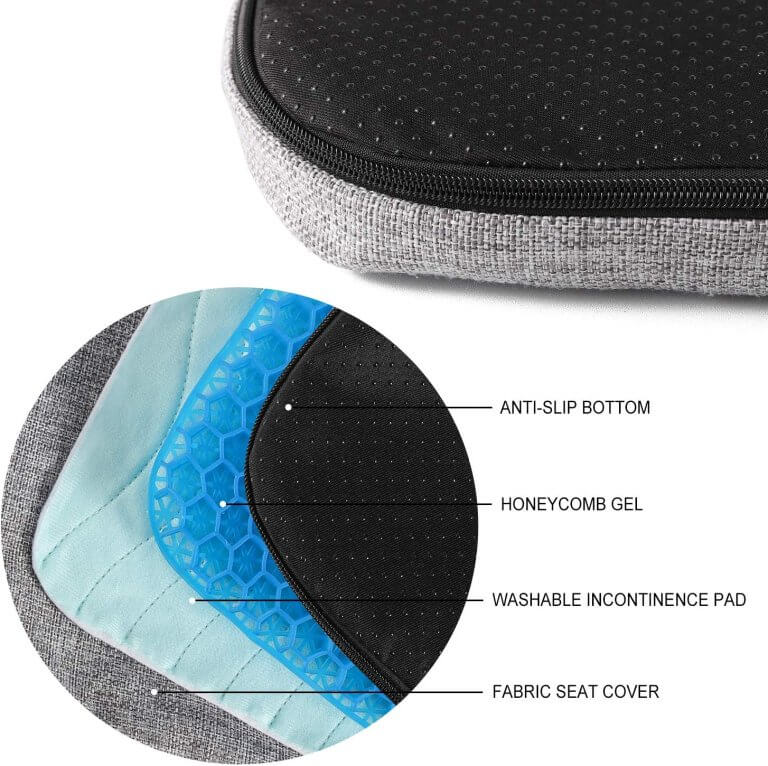
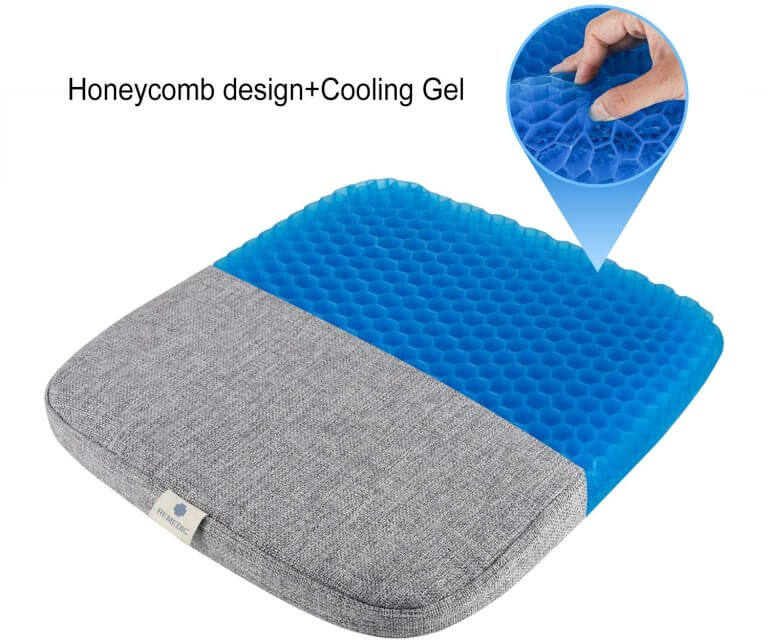
When it comes to elderly care, one of the biggest challenges is ensuring seniors remain comfortable while seated for extended periods. The Remedic Gel Seat Cushion is equipped with a medical-grade gel insert that evenly distributes weight, helping to relieve pressure on the hips, back, and thighs. This is especially beneficial for seniors who experience discomfort or pain when sitting for long periods, whether in a wheelchair, recliner, or regular chair. Its honeycomb design prevents skin irritation and helps avoid pressure sores—key concerns for caregivers looking to support their loved one’s comfort and well-being.
Discreet Leak Protection for Dignity and Peace of Mind
Maintaining dignity is essential for seniors dealing with daily challenges. The Remedic Gel Seat Cushion offers double leak protection with its absorbent pad and waterproof barrier, ensuring that any leaks are managed effectively and discreetly. Caregivers and family members no longer have to worry about urine leaks causing embarrassing situations or damaging furniture. This cushion provides a practical, waterproof solution that protects both the user and the surfaces beneath them.
Easy to Clean for Caregivers
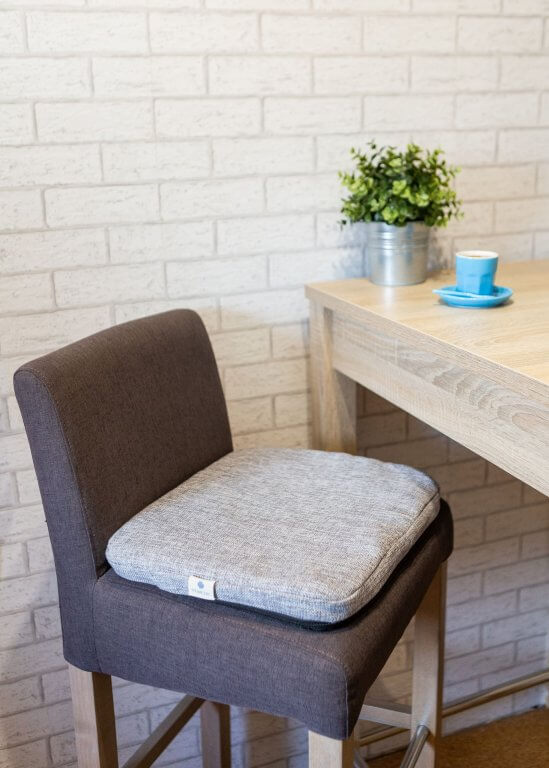
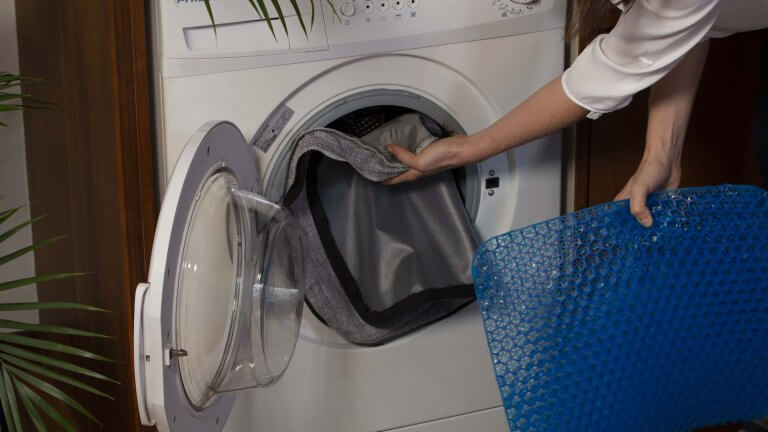
Caregivers often seek products that are not only effective but also easy to maintain. The Remedic Gel Seat Cushion is built with convenience in mind. It features a removable, machine-washable cover that allows for quick and easy cleaning after any accidents. The large zipper makes it simple to remove the gel insert, ensuring both the pad and cover remain hygienic. This ease of cleaning reduces stress for caregivers and ensures the cushion is always fresh and ready for use.
Non-Slip Design for Safety and Stability
One of the primary concerns for caregivers is ensuring that their loved ones are safe and secure in their chairs. The Remedic Gel Seat Cushion features a non-slip underside, which keeps it firmly in place on any chair, including wheelchairs and recliners. This feature adds a level of safety and stability, particularly for seniors with mobility issues, helping prevent falls or unnecessary movement.
Ideal for Senior Care, Homecare, and Daycare Centers
The versatility of the Remedic Gel Seat Cushion makes it a perfect solution for various settings, including homecare, senior care centers, and daycare facilities. Whether it’s used in a nursing home, an assisted living facility, or in the comfort of your home, this cushion provides reliable leak protection and comfort. Measuring 42 x 36 x 4.5 cm (16.5 x 14 x 2 inches), the cushion fits most chairs and is designed to meet the needs of those who require extended seating comfort and protection.
Protects Furniture from Stains
Accidents can happen, but they shouldn’t ruin your furniture. With the Remedic Gel Seat Cushion, caregivers no longer need to worry about staining couches, chairs, or wheelchairs. The double-layered waterproof barrier prevents liquids from seeping through, preserving the integrity of the cushion and furniture alike. This not only saves on cleaning time but also reduces the costs associated with replacing stained furniture.
Key Benefits of the Remedic Gel Seat Cushion for Senior Care:
- Pressure relief and comfort: Gel insert with honeycomb design to distribute weight evenly, reducing discomfort during long sitting sessions.
- Double leak protection: Absorbent inner layer and waterproof barrier to prevent leaks and protect furniture from urine or other fluids.
- Non-slip design: Ensures the cushion stays in place, making it ideal for wheelchairs, recliners, or dining chairs.
- Machine-washable cover: Easy to clean for caregivers, saving time and effort.
- Discreet and reliable: Offers seniors confidence and dignity with discreet protection from leaks.
- Versatile size: Fits most standard chairs, wheelchairs, and other seating options, making it perfect for use in homes, nursing homes, or care facilities.
Why Caregivers Trust the Remedic Gel Seat Cushion:
For caregivers, finding a balance between comfort, protection, and ease of use is critical. The Remedic Gel Seat Cushion addresses all these needs, providing long-lasting comfort, leak protection, and easy maintenance. By offering a discreet and effective solution for leak management, this cushion helps caregivers focus on what matters most—providing the best care possible for their loved ones or clients.
Ready to Support Your Loved One’s Comfort and Protection?
If you’re a caregiver looking for the best seat cushion to help manage leaks and provide comfort for seniors, the Remedic Gel Seat Cushion is your solution. Whether it’s for use at home or in a professional care setting, this cushion is built to last and designed to make caregiving easier.
Order now on Amazon or contact us for customer support.